

This issue has arisen in our support desk: a number of customers reported an error popping up when they attempt to launch a NumXL wizard or from the toolbar.
Background
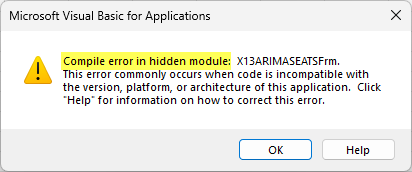
When a user selects a menu item (e.g., X13ARIMA-SEATS) from the NumXL toolbar, the wizard fails to load, and instead, Excel pops up a Visual Basic for Applications error message stating a compile error in a hidden module (i.e., NumXL module).
Analysis
Upon further investigation, we found that Excel is unable to initialize/launch one of the form controls – refedit, a control used extensively in NumXL to allow users to select a single cell or a range of cells in a workbook. The “refedit” control is an ActiveX control that comes with Microsoft Excel.
Examining the security settings (using the Excel Trust Center), we found that the ActiveX controls setting is set to “Disable all controls without notification”.
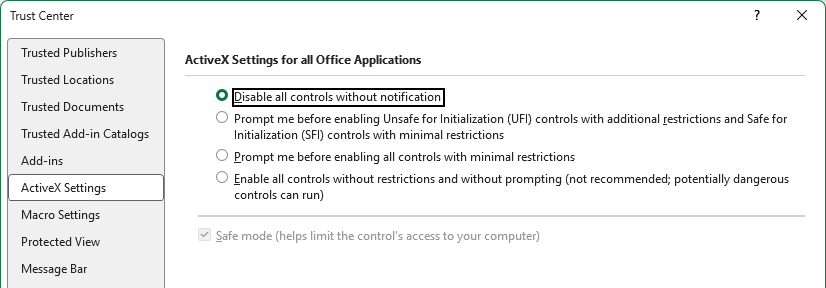
Microsoft turned off the ActiveX permission setting in a later Office update, rendering the “refedit” control, along with all other ActiveX controls, disabled.
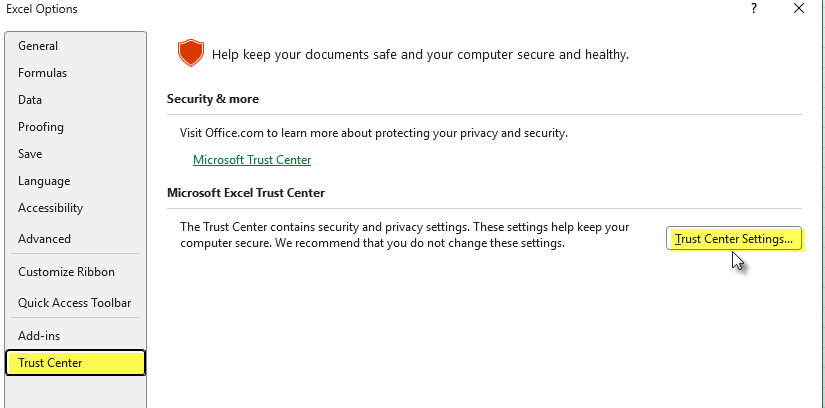
Note: To launch the trust center in Excel: navigate to File → Options → Trust Center → Trust Center Settings → ActiveX Settings.
Resolution
To re-enable the ActiveX controls in Microsoft Excel, change the Change the “disable all controls” option to another setting. For security reasons, we recommend selecting “Prompt me before enabling Unsafe Initialization (UFI) controls with additional restrictions and Safe for Initialization (SFI) control with minimal restrictions.”
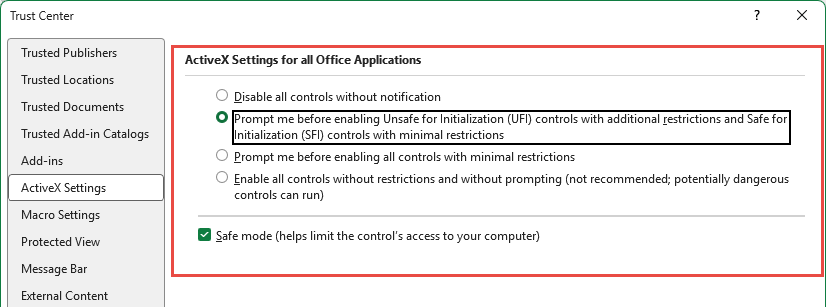
Press the “OK” button to close the Trust Center.
Close Excel